If you can see it, you can believe it.
Your goal, on your home screen.
Vision boards end up in a drawer. So make your goal an app, on the home screen you check all day.
How it works
Three steps, then it's yours.
- 1
Type your goal.
Tap the balance and type it: ten thousand, a hundred thousand, a million. Then split it however you like.
- 2
Name it. Add your logo.
Call it anything and upload your own logo. That's the icon you'll tap every morning.
- 3
Put it on your home screen.
No App Store needed: it goes on your home screen from Safari on iPhone or Chrome on Android, and we show you the taps. Then your goal is there every time you open it.
Make yours
Put your goal in the app you'd check.
Each one is laid out like the real kind of app, with a goal already in it for you to change. None of them is linked to a bank, exchange or wallet account. Free to make. Free apps carry a Pozer mark; Pro removes it.
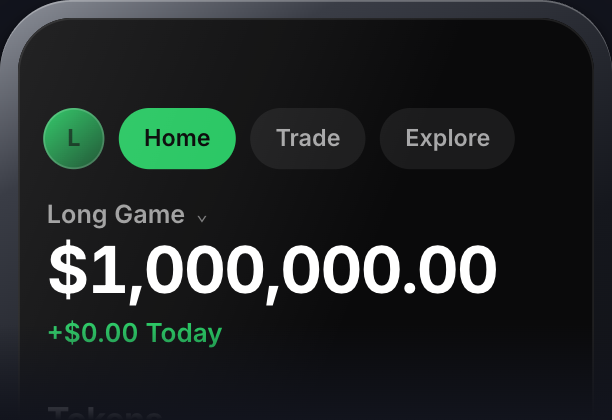

Vantom
Laid out like a wallet app
A million, split however you like.
Make this one →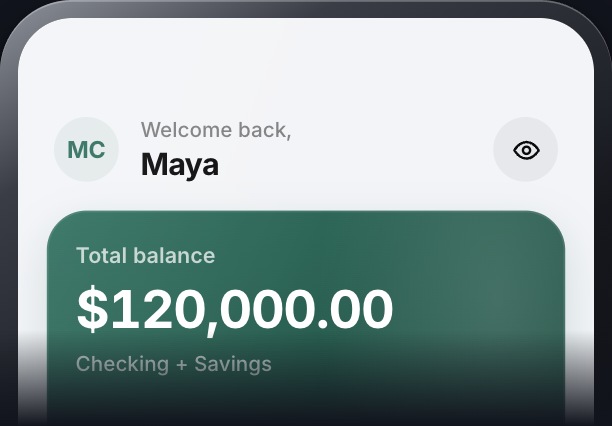

Norwyn
Laid out like a bank app
Your name on it, and a house fund in savings.
Make this one →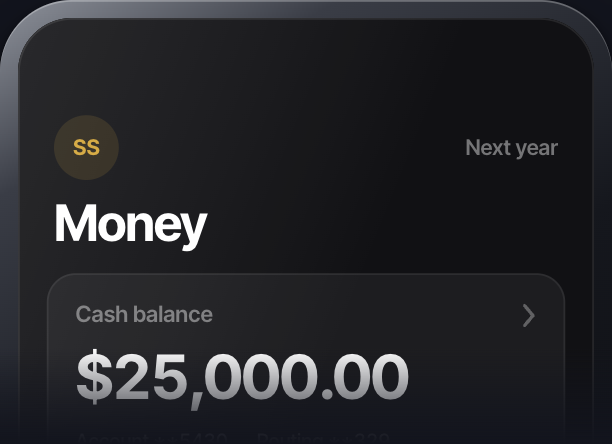

Tender
Laid out like a payment app
Next year's balance, right up top.
Make this one →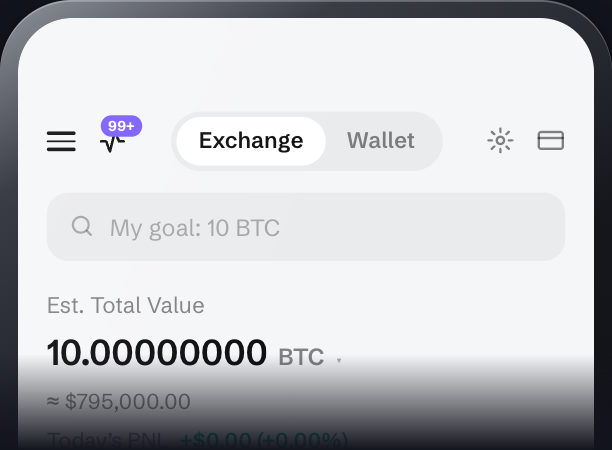

Bourse
Laid out like an exchange app
Your goal counted in bitcoin.
Make this one →
How seeing it helps
Athletes rehearse the race before they run it.
It isn't magic. What you see every day is what you think about, and what you think about is what you tend to work on. A vision board in a drawer can't keep it in sight. Your phone can: you already pick it up dozens of times a day.
- Visualize
See the number, then see the steps.
In a UCLA study, students who spent a few minutes a day picturing themselves studying started earlier, studied more and scored higher than students who pictured getting the grade. So let the number be your cue, then picture today's step.
Pham & Taylor, 1999
- Affirm
Name what matters to you.
In studies reviewed by Cohen & Sherman, people who took a few minutes to write about a value that matters to them coped better with stress and pressure. Name your balance after yours, like “Freedom” or “Long Game”, and you'll read it every time you open the app.
Cohen & Sherman, 2014
- Believe
Believe it enough to act.
Gabriele Oettingen's research found that daydreaming about a goal can drain the energy to chase it. What helped was picturing the goal, then what stands in the way, when people believed they could get there. So when it opens, name one obstacle and your next step.
Oettingen, 2014
See it. Believe it. Work for it.
No app can do the work for you. This one keeps your goal in front of you while you do it.
A vision board, not a bank.
It isn't linked to any bank, exchange or wallet account, and it can't hold or send real money. It shows the numbers you type. It's for you: never use it to show anyone money that isn't there. How it may be used
Questions
Is it free?
Yes. Making your goal app and putting it on your home screen are free, with no card. Free apps carry a Pozer mark; Pro removes it (US$4.99/wk or US$12.99/mo).
Does it work on my phone?
Yes, on iPhone and Android. There's nothing to download from an app store: it goes on your home screen from Safari on iPhone or Chrome on Android, with your name and logo on the icon.
Do I need an account?
Only to keep it. You make the whole app first; when you save it, we email you a six-digit code to sign in, with no password. That keeps the app yours, so you can change your goal later.
Is it a real bank or wallet?
No. It isn't linked to any bank, exchange or wallet account, and it can't hold or send real money. It shows the numbers you type, for you.
Will anyone else see it?
Only if you show them. Your app isn't listed anywhere or shown in search. It opens from your home screen, or from its own link if you choose to share it.
Can I change my goal later?
Yes. Change it right inside the app on your phone, whenever you like.